

July 23, 2026
General Structure of an Autonomous Agent Framework
A model on its own only answers questions. An agent pursues a goal — it reasons, remembers, and acts in a loop until the work is done. A walk through every part of that system, in everyday language.
Human-inspired · AI-authored
Jeffery Myers · Founder & Chief Imagineer, HumanAIFusion & Director, HannahLabs
If you have ever used a chatbot, you have met the brain of an AI system. An autonomous agent is what happens when you give that brain a goal, a memory, a set of tools, and the freedom to keep working until the job is finished — with a human setting the direction and staying in charge.
Below, each part of the diagram is explained on its own. Read them in order for the full picture, or jump to whichever piece you are curious about.
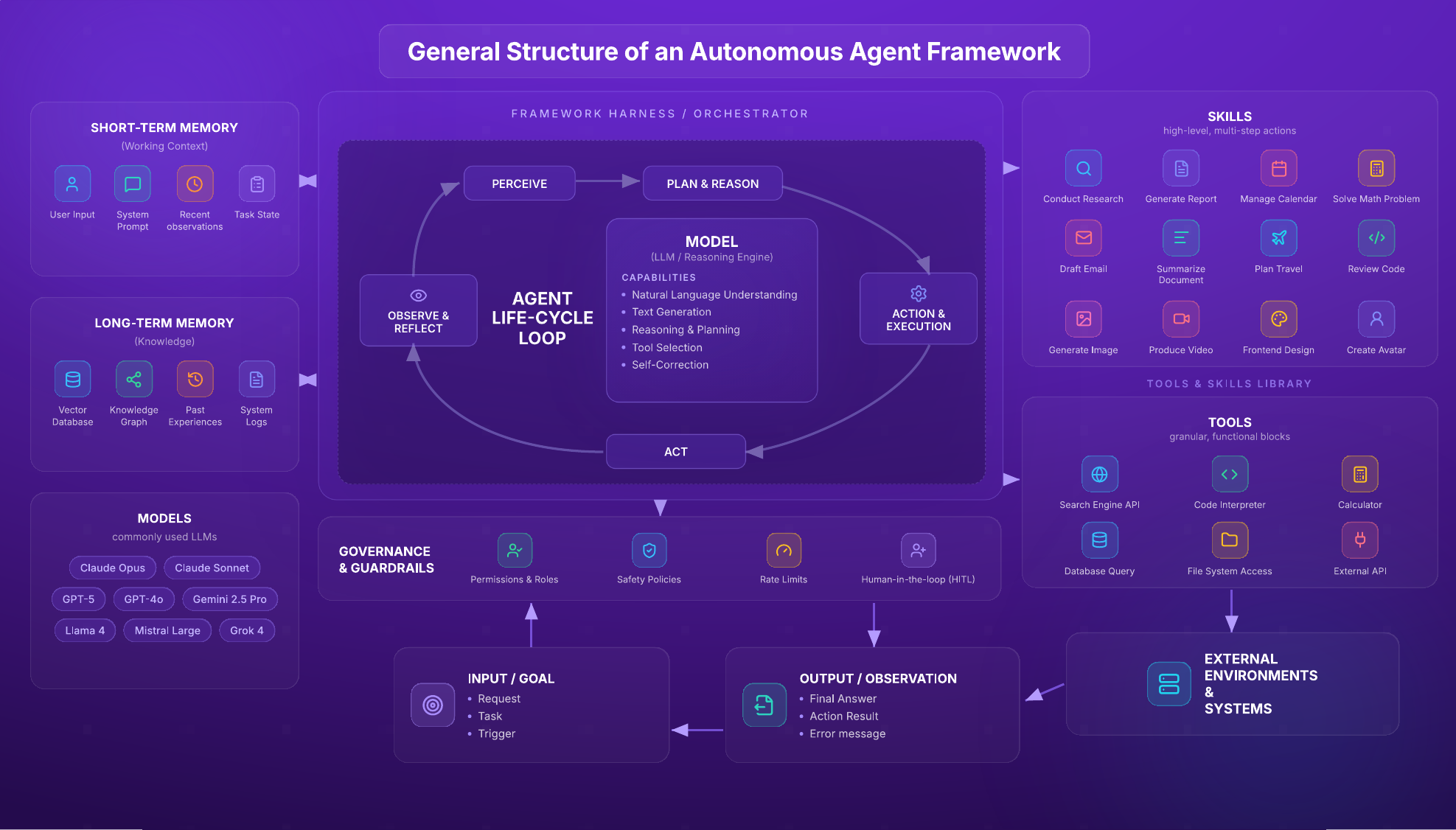
The complete framework at a glance. Each part is explained in the sections that follow.
Where It Begins: Input / Goal
Everything starts with something you want done. That might be a request ("summarize these three reports"), a task ("book me a flight"), or an automatic trigger (a new email arrives). This is the agent's marching order — the finish line it is working toward.
In plain terms
You tell it what "done" looks like. The clearer the goal, the better the result.
The Conductor: The Framework Harness / Orchestrator
The harness is the software that holds everything together and keeps the agent running. Think of it as the conductor of an orchestra: it doesn't play an instrument itself, but it decides who plays when, keeps time, and makes sure the performance moves toward the finish. It takes your goal, hands work to the AI brain, calls on tools, checks the results, and repeats — without you having to press "go" at every step.
In plain terms
It is the "autopilot" that runs the whole process from start to finish.
The Heartbeat: The Agent Life-Cycle Loop
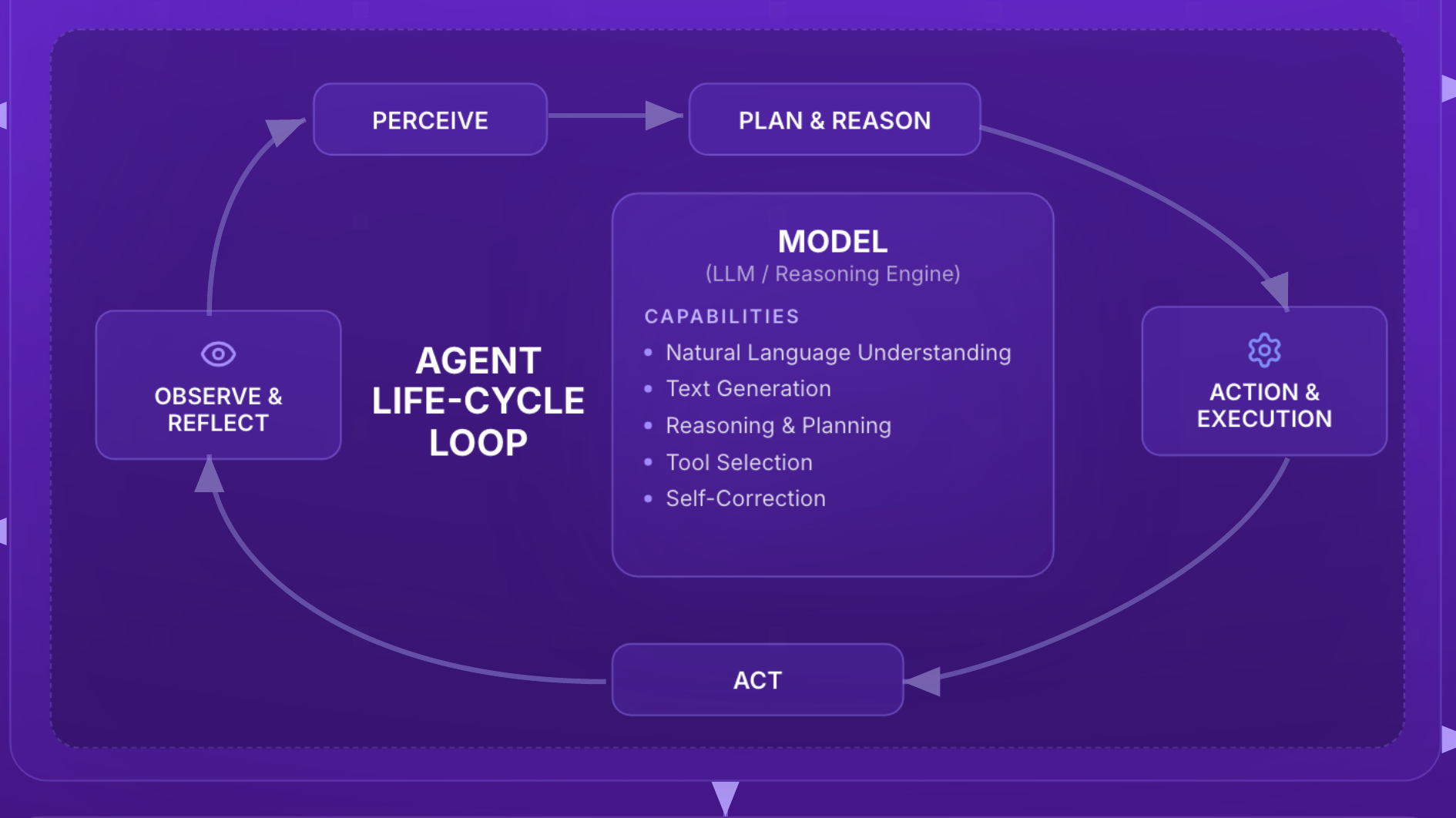
Inside the harness, the agent repeats a simple four-step cycle — the same way a person tackles a project: look, think, do, then check. It goes around this loop again and again until the goal is met.
- Perceive — Take in the situation — the request and whatever it has learned so far.
- Plan & Reason — Decide the next best step and which tool or skill to use.
- Act & Execute — Do the thing — run a search, send an email, make a calculation.
- Observe & Reflect — Look at the result, learn from it, and decide whether to loop again.
The Brain: The Model (LLM / Reasoning Engine)
The model is the thinking part — a Large Language Model, or "LLM." It reads and writes in plain language, understands what you are asking, breaks big problems into steps, chooses which tool fits, and can even catch and correct its own mistakes. It is the judgment at the center of the agent.
Its core abilities
Understanding language, writing responses, reasoning and planning, choosing tools, and self-correction.
Choices of Brain: The Common LLMs
There isn't just one brain to choose from. Several companies build powerful models, and an agent can be pointed at whichever one fits the job — balancing cost, speed, and skill. A few you may hear about:
Claude Opus · Claude Sonnet · GPT-5 · GPT-4o · Gemini 2.5 Pro · Llama 4 · Mistral Large · Grok 4
What It's Holding Right Now: Short-Term Memory (Working Context)
This is the agent's "desk" — everything it is actively working with in the moment: your latest input, its instructions (the system prompt), the things it has just seen, and where it is in the task. Like short-term memory in people, it is fast to reach but limited in size, and it clears when the job is done.
Holds
User input, system prompt, recent observations, and current task state.
What It Remembers Over Time: Long-Term Memory (Knowledge)
This is the agent's "filing cabinet" — knowledge it can look up whenever it needs to, even across different tasks and days. It might store documents, facts, connections between ideas, and a record of what worked before, so the agent gets smarter and more consistent over time instead of starting from scratch each time.
Holds
A searchable knowledge store, connected facts, past experiences, and system logs.
What It Knows How to Do: Skills
Skills are the agent's "know-how" — bigger, multi-step jobs it has been taught to handle from beginning to end. Where a single tool does one small thing, a skill strings several actions together into a finished piece of work.
Examples
Conduct research, generate a report, manage a calendar, solve a math problem, draft an email, summarize a document, plan travel, review code, generate an image, produce a video, design a web page, or create an avatar.
What It Can Reach For: Tools
Tools are the agent's "hands" — the specific, single-purpose functions that let it act in the real world instead of just talking about it. Each tool does one job well, and the model decides which one to pick up for the step at hand.
Examples
A search-engine lookup, a code interpreter, a calculator, a database query, file access, or a connection to another app's API.
The Safety Rails: Governance & Guardrails
Because an agent can act on its own, it needs rules that keep it safe, honest, and under human control. Guardrails set the boundaries — what the agent is allowed to do, how far it can go, and when it must pause to ask a person first. This is what keeps autonomy trustworthy.
Includes
Permissions and roles, safety policies, rate limits, and a human-in-the-loop for important decisions.
The Outside World: External Environments & Systems
When the agent uses a tool, it is usually reaching into the world beyond itself — the internet, your company's software, a calendar, a payment system, a database. These are the real places where its actions actually happen and have effects.
In plain terms
The apps, websites, and systems the agent touches to get real work done.
The Result: Output / Observation
Finally, the agent produces something. That might be a final answer for you, the result of an action it took, or an error message if something went wrong. Notice the loop: an observation can feed straight back into the cycle, letting the agent adjust and try again until your goal is truly met.
In plain terms
What you get back — and, often, what the agent learns from to keep improving.
Putting It All Together
You give a goal. The harness runs a loop: the model thinks, drawing on memory, then uses tools and skills to act on real systems — all inside safe guardrails — until it produces a result. The future of work isn't human or AI — it's both.